Physics Placement
The physics placement mode allows you to add scenes by dropping them and letting them fall and interact with the existing geometry to create a more natural look. In this mode a gizmo will appear in the scene and by dragging you can start to drop scenes according to the collision mask, and the random drop profile set on the current GdSpawn node (Interface). The simulation will run until all the physics object are settled or a maximum time has passed or the simulation is ended manually. You can undo/redo only at the end of the simulation.
The random spawn profile lets you define a list of scenes that should be spawned when dragging the gizmo.
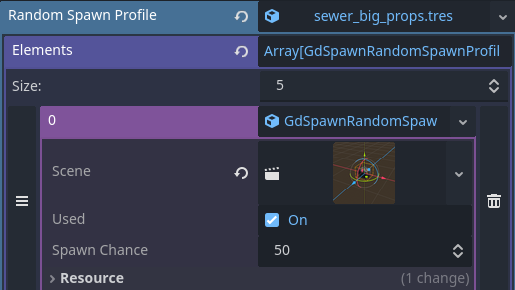
You can set for each scene the chance (between 0-100) that it will be spawned and whether it is used or not. You can drag and drop scenes from the scene palette to populate the scene field of the random spawn profile. Each profile can be saved as a resource.
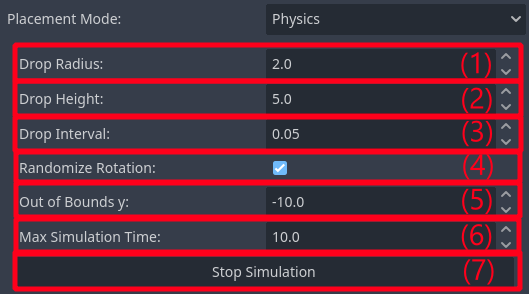
The radius the scenes are spawned in.
The height the scenes are spawned at.
The interval between each scene spawn.
Enable/Disable rotation randomization for the scene spawned.
Maximum vertical distance the scenes are allowed to travel, useful for mitigating scenes clipping out of bounds of geometry.
Maximum time the simulation is allowed to run before committing the scenes.
Press this button to stop the simulation early.