Settings and Configuration
In the Project Settings you can configure the GdSpawn settings and shortcuts. You have to turn on Advanced Settings.
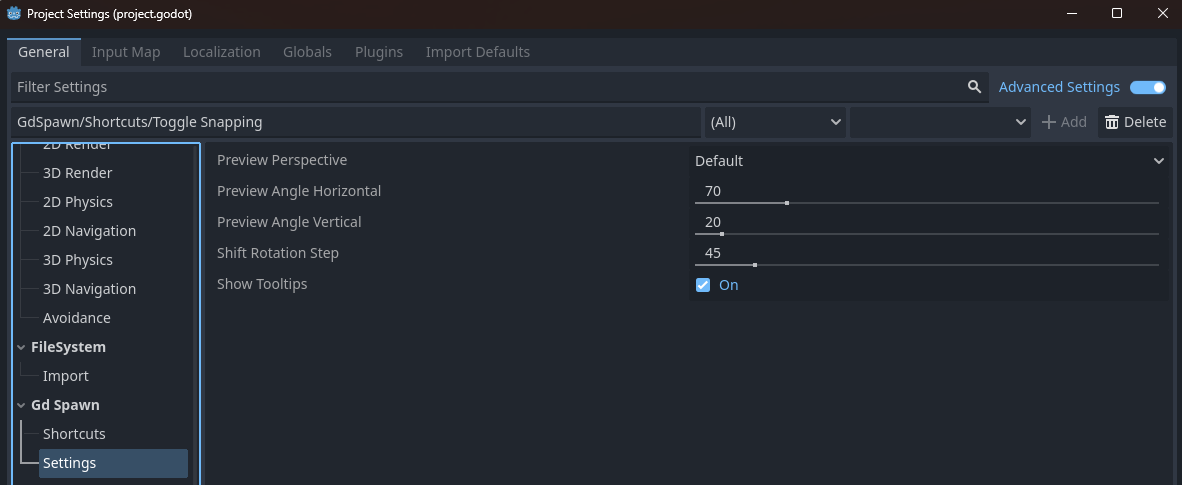
Global thumbnail preview preset, can be overridden by libraries and scenes individual presets.
Angles of the global preview thumbnail when the preset is Default.
Rotation increment when pressing Shift.
Enable Tooltips in the 3D editor main window.
Theese are the shourtcuts you can edit.
Action |
Keybinding |
|---|---|
Rotate 90 degrees around X |
A |
Rotate 90 degrees around Y |
S |
Rotate 90 degrees around Z |
D |
Reset transformation |
Shift+E |
Select previous asset (when none selected) |
Space |
Place and select Modifier |
Alt |
Temporarely disable snapping |
Ctrl |
Move plane (in plane placement mode) |
G |
Flip on X axis |
1 |
Flip on Y axis |
2 |
Flip on Z axis |
3 |
Select YZ plane (in plane placement mode) |
Z |
Select XZ plane (in plane placement mode) |
X |
Select XY plane (in plane placement mode) |
C |